G Peak Pro Bike Computer
Publisher Description


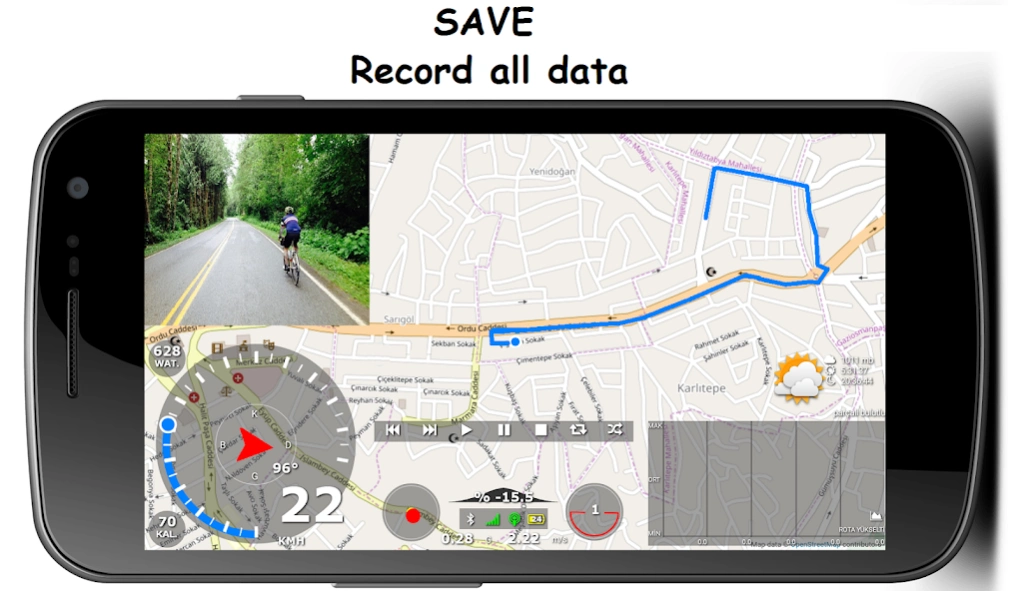
Bicycle computer with GPS based telemetry information
Turn your phone into a complete road computer for a more enjoyable time with your bike!
Take your adventure to the next level with G Peak Lite, the best app for MTB ciler and City bikes!
G Peak Lite turns your smartphone into a bike computer with 90+ exciting features. Whether you have your favorite route or not, the G Peak Lite is your perfect roadside assistant.
It is also the only trip computer application that can open your routes in GPX, KML, KMZ, CSV, TCX and JS formats !!
Strong basic features
* Sensor support
-- Heart rate sensor
-- Speed sensor
-- Cadence sensor
* Two different home screens
-- Simple screen
-- Detailed screen
* Speedometer
-- Instant speed
-- Maximum speed
-- Average speed
* G force measurement
-- instantaneous force of g
-- Maximum acceleration force g
-- Maximum deceleration force g
* Compass (in Direction and Degrees)
* Acceleration indicator
-- Instant acceleration
-- Maximum acceleration
* Angle indicator
-- Instant bike's inclination to the road
* Slope (every 25 meters)
-- instantaneous slope
-- Maximum descent slope
-- Average descent slope
-- Maximum output slope
-- Average output slope
* Navigation (Pro version)
-- 4 different route options
-- Automatic route creation when off-route
-- Voice guidance
* Music player
* Ability to work on other apps and on the lock screen (Pro version)
* Weather information
-- Temperature
-- Wind speed
-- Wind direction
-- Humidity
-- sunrise
-- Sunset
-- Atmospheric pressure
-- Weather zone name
-- Weather detail
* Distance information
-- daily distance
-- Total distance
-- Route distance
-- Route descent distance
-- Route climb distance
-- Route straight distance
* Height information
-- instantaneous altitude
-- Height difference
-- Height earned
-- Height lost
-- Maximum height
-- Minimum height
* Duration information
-- Time and date
-- Daily working time
-- Total working time
-- Total route time
-- Moving route time
-- Music playing time
-- Music length time
* Route location bar
-- Switching between locations in Saved Route
-- The current location of the selected location;
-- Show Speed, Altitude, Heart Rate, Cadence and Distance information
* 8 Different 3D Mapbox Map layers (Pro version)
* Track recording and viewing
-- Track recording (in GPX, JS format)
-- Viewing track record (in GPX, KML, CSV, KMZ, TCX and JS format)
-- Share track record
-- Creating waypoints
-- Adding pictures to waypoints
* Creating waypoints
-- Creating waypoints while recording or in the recorded route
-- Adding pictures to waypoints
* Calories measurement
-- Total calories
-- Average calorie (Hour / Calorie)
* Energy measurement (every 25 meters)
-- Instant energy
-- Maximum energy
-- Average energy
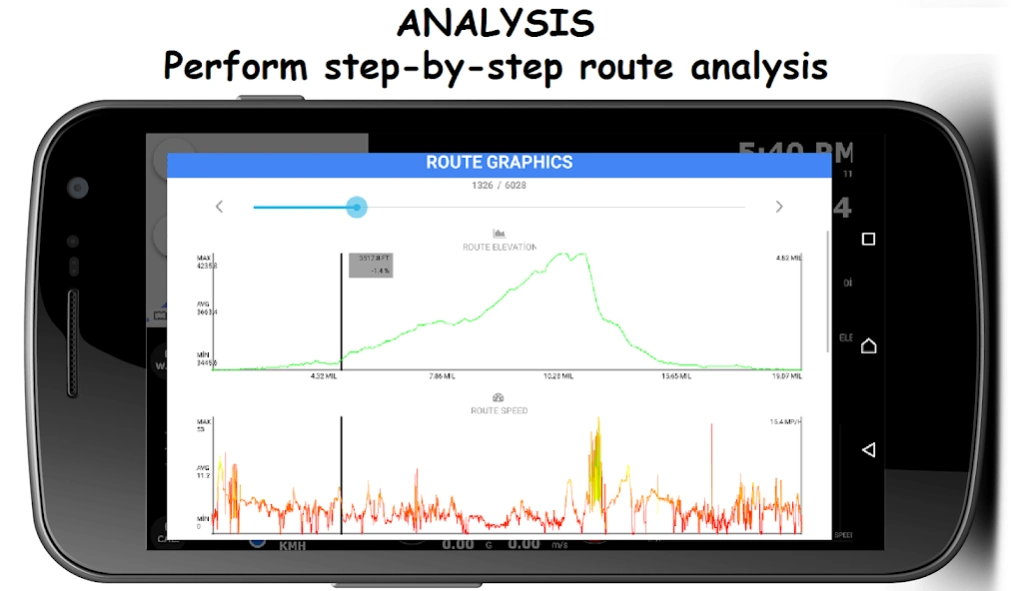
* Graphics
-- Instant speed graph
-- Instant heart rate graph
-- Instant cadence graph
-- Route elevation graph
-- Route speed chart
-- Route heart rate graph
-- Route cadence chart
-- Weather graph (5 days and hourly)
* Personal information screen
-- 7 different information screens
-- Changeable text color
-- Changeable font
* Camera
-- Front and rear camera switching
-- Taking pictures
-- Add effects to camera
-- Screen capture
* Connection symbols (BT, INT., GPS)
* Headlight
* Horn
* Battery status icon
* Screen touch blocking
* Language support
-- Turkish
-- The English
-- German
-- French
-- Italian
About G Peak Pro Bike Computer
The company that develops G Peak Pro Bike Computer is Fatikngage. The latest version released by its developer is 1.0 .
To install G Peak Pro Bike Computer on your Android device, just click the green Continue To App button above to start the installation process. The app is listed on our website since 2022-07-13 and was downloaded 7 times. We have already checked if the download link is safe, however for your own protection we recommend that you scan the downloaded app with your antivirus. Your antivirus may detect the G Peak Pro Bike Computer as malware as malware if the download link to com.fatikngage.gpeak is broken.
How to install G Peak Pro Bike Computer on your Android device:
- Click on the Continue To App button on our website. This will redirect you to Google Play.
- Once the G Peak Pro Bike Computer is shown in the Google Play listing of your Android device, you can start its download and installation. Tap on the Install button located below the search bar and to the right of the app icon.
- A pop-up window with the permissions required by G Peak Pro Bike Computer will be shown. Click on Accept to continue the process.
- G Peak Pro Bike Computer will be downloaded onto your device, displaying a progress. Once the download completes, the installation will start and you'll get a notification after the installation is finished.
Program Details
System requirements
Download information
Pricing
Version History
version 3,52
posted on 2022-07-13
* Added power sensor support.
* Can now view .gps route files.
* "Energy" graph has been added to the route graphs screen.
* Added "General Settings > > Navigation Settings > > Guidance sounds".
* Instant power graph has been added to the main screen.
* File type filtering feature has been added to the route menu.
* Energy data is now saved in the .gpx file type when recording a route.
* Music player; now only plays if in the foreground, pauses if it is in the background.
version 3,33
posted on 2022-04-17
* A menu has been added to the route menu to start navigation at the beginning or end of the selected route.
* Added "Mark maximum limit points" option to route options menu.
* You can use it in reverse horizontally or vertically by turning your device.
* Multiple routes in kml route file can now be viewed separately, climbs can be viewed separately. data can be viewed separately.
* Improved location bar.
version 3,24
posted on 2022-02-27
* Added drawing feature to route menu.
-- From this menu, you can view and save the length of the route drawn, the number of locations, travel time.
* Added pin protected bike alarm.
-- The alarm will sound if your bike is moved when you go to get water or are on a break.
* Added "General Settings > > Alarm" menu.
* Reworked the weather and developer screen for the horizontal screen.
* Visual improvements.
* Performance improvements.
* Bug fixes.
version 2,73
posted on 2021-09-11
* The problem that the music player cannot find mp3 on Android 10 and above devices has been fixed.
* By adding heart rate and cadence information to the information screen, it has been increased to a total of 9 pages.
* Improved viewing of Kml and Gpx files.
* The screen has been improved to display the waypoints in the route files as a list.
* The slope calculation algorithm has been rearranged.
version 2,64
posted on 2021-07-26
* Fixed height graph drawing error when creating route in navigation.
* Fixed a location search error by selecting a category in the Places menu.
* Address information screen has been added to the Places menu. From this menu;
-- Can view the address information of your current location
-- Can display address information of registered locations
-- You can view the address information of the location you selected on the map.
* Improvements have been made to the display of .kml files.
version 2,59
posted on 2021-03-25
* Voice guidance in navigation is set to be active by default.
* While showing the recorded route;
With the start-end positions, the positions of the pictures are set to be shown by default.
* Performance improvements.
* Bug fixes.
version 2,30
posted on 2020-12-07
* Heart rate sensor support has been added.
* Speed sensor support has been added.
* Cadence sensor support has been added.
* "Sensor settings" menu has been added to the general settings menu.
* Sensor settings menu;
Search for new sensors
Added sensors menu has been added.
* The automatic connection feature of sensors has been added at startup.
* "Rim and tire" menu has been added to the user settings menu.
* Pulse and cadence data were added while recording the route in Gpx format.
version 1,97
posted on 2020-10-28
* .Csv route files and .loc location point files are now displayed.
* Weather forecast for 5 days and 3 hours has been added.
* You can reach the highest and lowest temperature, humidity, wind speed and direction information.
* Maneuver list and Prediction search by address have been added to the navigation.
* Display size setting has been removed from "Speed Settings" section.
* "Colorize" menu has been redesigned.
* "Font" menu has been added.
* Performance improvements.
* Various bug fixes.
version 1,90
posted on 2020-07-01
* Now the .kmz files are displayed.
* Improvements were made in the selection of the music folder.
* Translation errors fixed.
* Negative value was prevented from entering the age and weight settings.
* Weather menu ;
current location
registered location
added the ability to see the weather by searching for words.
* Places menu ;
search by name
search feature was added by selecting a category.
* Search results;
Show on map
Save location
Get directions
Call
Share options added.
version 1,85
posted on 2020-04-19
* Route recording can now be made in .gpx format.
* Improvements have been made to display location points in GPX files.
* Now .tcx files can also be viewed.
* Added auto horn playing feature while slowing down.
* Improvements have been made regarding GPS connection icon.
* In location and overlays;
With "Plus code", the locations are shared by converting them into short codes.
* Screen lock has been added to prevent you from touching the screen unintentionally (eg in wet conditions).
